



An overseas education consultant website should help students understand their options, assess your agency’s credibility and take a clear next step toward counselling. It should also deliver each enquiry to someone responsible for following it up.
M4YOURS IT recommends starting with accurate service information, useful destination pages, genuine evidence of your work and a reliable enquiry process. Expand into university search, student accounts or application portals when you have the information and staff capacity to maintain them.
The first design decision is what a student needs to understand before contacting your team. Build the pages, content and forms around that journey.
What Should the Website Help Visitors Do?
Plan around four practical questions:
- Can this agency help me? Explain the destinations, study levels and services your team actually supports.
- Why should I trust it? Present identifiable staff, clear contact information and evidence visitors can assess.
- What would the process involve? Describe the steps, responsibilities and information required.
- How do I begin? Offer a suitable counselling, enquiry or contact route and explain what happens next.
A student exploring options may need a destination guide. Someone ready to speak may need a booking form. Make both routes easy to find.
Essential Pages for an Overseas Education Consultant Website
| Page | Main purpose | Useful content and next action |
|---|---|---|
| Homepage | Introduce your agency and guide visitors | Supported destinations, services, evidence and a counselling invitation |
| About and team | Explain who provides the service | Agency background, staff roles, relevant experience and office details |
| Services | Define the support available | Scope, process, student responsibilities and how to request assistance |
| Destination pages | Help students research a study location | Study routes, planning considerations, sourced information and relevant questions |
| Universities and programmes | Present options your team can support | Accurate listings, relationship context, enquiry routes and update responsibility |
| Scholarships and resources | Answer specific research questions | Eligibility context, deadlines, source links and reviewed guidance |
| Student experiences | Show documented examples of your work | Approved stories with clear context and genuine feedback |
| Events | Support counselling sessions and information events | Confirmed date, format, location, registration and contact details |
| Contact and booking | Help visitors reach the right team | Branch details, channels, booking information and a clear form |
Introduce listings and event sections when there is useful content to publish and someone responsible for maintaining it.
For a new agency, a smaller set of complete pages can provide a clear first release.
How Should the Homepage Be Structured?
Use a sequence that helps visitors understand your offer and decide where to go.
- Opening message: State who you help, the support you provide and the next step.
- Destinations: Link to the study locations your agency supports.
- Services: Explain what students can ask your team to help with.
- Process: Show how an enquiry progresses through counselling and the agreed service.
- Evidence: Present genuine team information, relevant relationships and approved student experiences.
- Useful resources: Feature a few guides that answer common planning questions.
- Contact invitation: Offer an enquiry or counselling route with clear expectations.
A possible opening message is:
Explore your study options with guidance on programme selection, applications and preparation.
Adjust the wording to match your actual service.
Use a specific primary action such as Book a Counselling Session. Place secondary options where they help visitors continue their research.
Build Destination Pages Around Student Decisions
A destination page should help students identify what they need to investigate and prepare.
Recommended sections include:
- Study levels and routes your team supports.
- How institution and programme selection works.
- Intake planning and where dates must be verified.
- Tuition and living-cost planning, with currency, period and assumptions stated.
- Application preparation and information to discuss with a counsellor.
- Scholarship research with links to the relevant provider.
- Questions your team hears from students and parents.
- A destination-specific enquiry route.
When publishing changing requirements, costs or deadlines, link to the responsible institution or official authority. Record who reviews the page and what was checked.
Distinguish general planning information from a student’s individual assessment. Give visitors a clear way to ask about their own circumstances.
Show Evidence Students and Parents Can Assess
Make your agency easy to identify. Publish the business name, office locations, working contact channels and the people responsible for student support.
For counsellor profiles, use accurate role descriptions, genuine photographs and relevant experience. Describe institutional relationships clearly, including how an application is submitted where that matters to the student.
For testimonials and student stories, obtain appropriate permission and explain the context. An identifiable experience can help visitors understand the service provided; it should not imply that everyone will receive the same result.
Keep service information equally clear. Explain what support is included, when fees are discussed and which next steps depend on external decisions.
Design an Enquiry Form People Can Complete
Collect the information needed to respond usefully. A first enquiry might ask for:
- Name.
- Preferred contact method and the relevant contact details.
- Current or highest education level.
- Study destination interest, including an undecided option.
- Intended study level or planning period, if useful.
- A short question or message.
Reserve detailed document collection for the stage when it is required. Explain how the information will be used and what response the visitor should expect.
W3C’s guidance on form labels recommends identifying form controls with descriptive labels and associating those labels with the controls. W3C
Use clear visible labels, required-field instructions and useful feedback when input needs correction.
After submission, confirm receipt. A requested appointment should remain distinguishable from a confirmed booking unless the booking system has actually reserved the time.

Connect Website Enquiries to Counsellor Work
Define what happens after each form, booking request or contact action.





| Student matching | Help staff identify returning students without merging unrelated people |
| Assignment | Name the responsible team member and a fallback owner |
| Next action | Create the appropriate contact or review task |
| Confirmation | Tell the visitor what was received and what happens next |
| Transfer failure | Make the failure visible and assign someone to recover it |
Test the journey with a real submission during acceptance. Ask the assigned staff member to find it, explain its context and record the next action.
Our education consultancy all-in-one platform guide explores the relationships between student records, staff responsibilities and wider agency operations.

Make the Mobile Experience Easy to Use
Test the tasks students will perform:
- Reading a destination guide.
- Opening the menu.
- Checking contact information.
- Completing a form.
- Returning after an input error.
Keep text readable, links identifiable and controls easy to operate. Check that chat buttons, banners and other fixed elements leave the content and form controls usable.
Review loading, responsiveness and layout stability too. Google’s Web Vitals guidance defines these good-experience targets, assessed at the 75th percentile and segmented by mobile and desktop. web.dev
| Metric | What it measures | Good-experience target |
|---|---|---|
| Largest Contentful Paint | Main content loading | 2.5 seconds or less |
| Interaction to Next Paint | Response to interaction | 200 milliseconds or less |
| Cumulative Layout Shift | Unexpected layout movement | 0.1 or less |
Use development tests to identify problems before launch and review real-user measurements when available.
Investigate heavy images, unnecessary scripts or moving layouts when they interfere with actual visitor tasks.






Plan SEO Around Useful Student Questions
Give each page a clear purpose. A destination guide, application-support service page and event page should each answer the question that brought the visitor there.
Google’s helpful content guidance recommends content created for people, with useful information, clear sourcing and relevant expertise. It also cautions against changing dates to suggest freshness without substantive changes. developers.google.com
For an education consultancy website, our recommended application of that guidance is to:
- Write from the questions your counsellors regularly receive.
- Add practical explanations and agency-specific service details.
- Link related guides, services and enquiry routes.
- Review changing information against responsible sources.
- Use descriptive titles, headings and link wording.
- Maintain clear URLs and redirect replaced pages during a redesign.
Choose content your team can keep useful. Assign a reviewer to destination information, scholarship deadlines and other time-sensitive material.
Choose the Website Scope Your Team Can Maintain
| Requirement | Scope to evaluate | Operating responsibility |
|---|---|---|
| Explain services and receive enquiries | Content-managed website with connected forms | Keep pages current and handle incoming enquiries |
| Run destination campaigns and events | Reusable landing pages, booking or registration functions | Maintain offers, dates, capacity and follow-up |
| Publish substantial university or programme information | Structured listings with suitable search and filters | Verify data, maintain relationships and correct outdated entries |
| Support ongoing student self-service | Connected portal or custom web application | Define access, document review, updates and support ownership |
Review suitable existing capabilities before specifying custom development. Define additional work around requirements that remain important after that review.
What Should the Website Proposal Cover?
A useful proposal identifies:
- Pages, reusable layouts and languages.
- Content writing, photography and migration responsibilities.
- Forms, booking functions and CRM connections.
- Listings, portals or other custom functions where required.
- Mobile usability, accessibility and performance checks.
- Hosting, account ownership, backups and maintenance.
- Staff training, documentation and launch support.
Agree on milestones for structure, content, design, development, testing and handover. Set the schedule after reviewing the content volume, integrations and custom work.
Compare proposals against the same requirements. Include ongoing content updates and support when assessing the budget.

Check the Complete Journey Before Launch
Use representative student tasks during review:
- Find the service and destination relevant to a fictional student.
- Identify who provides support and how to contact the correct office.
- Complete a mobile enquiry and correct a deliberate input error.
- Check the confirmation and any appointment status.
- Find the enquiry in the staff system and confirm its owner.
- Update a destination page through the agreed editing process.
- Recover a failed submission or integration transfer.
Check keyboard navigation, important links, contact routes and redirects from replaced pages.
Confirm who controls the domain, hosting, website administration and connected accounts.
Track completed enquiries separately from button clicks. Review enquiry quality and counselling outcomes alongside website activity so the team can understand what happens after a visit.
How M4YOURS IT Can Help
M4YOURS IT’s education consultancy services include website development, landing pages, SEO, CRM implementation, automation and analytics. M4YOURS IT
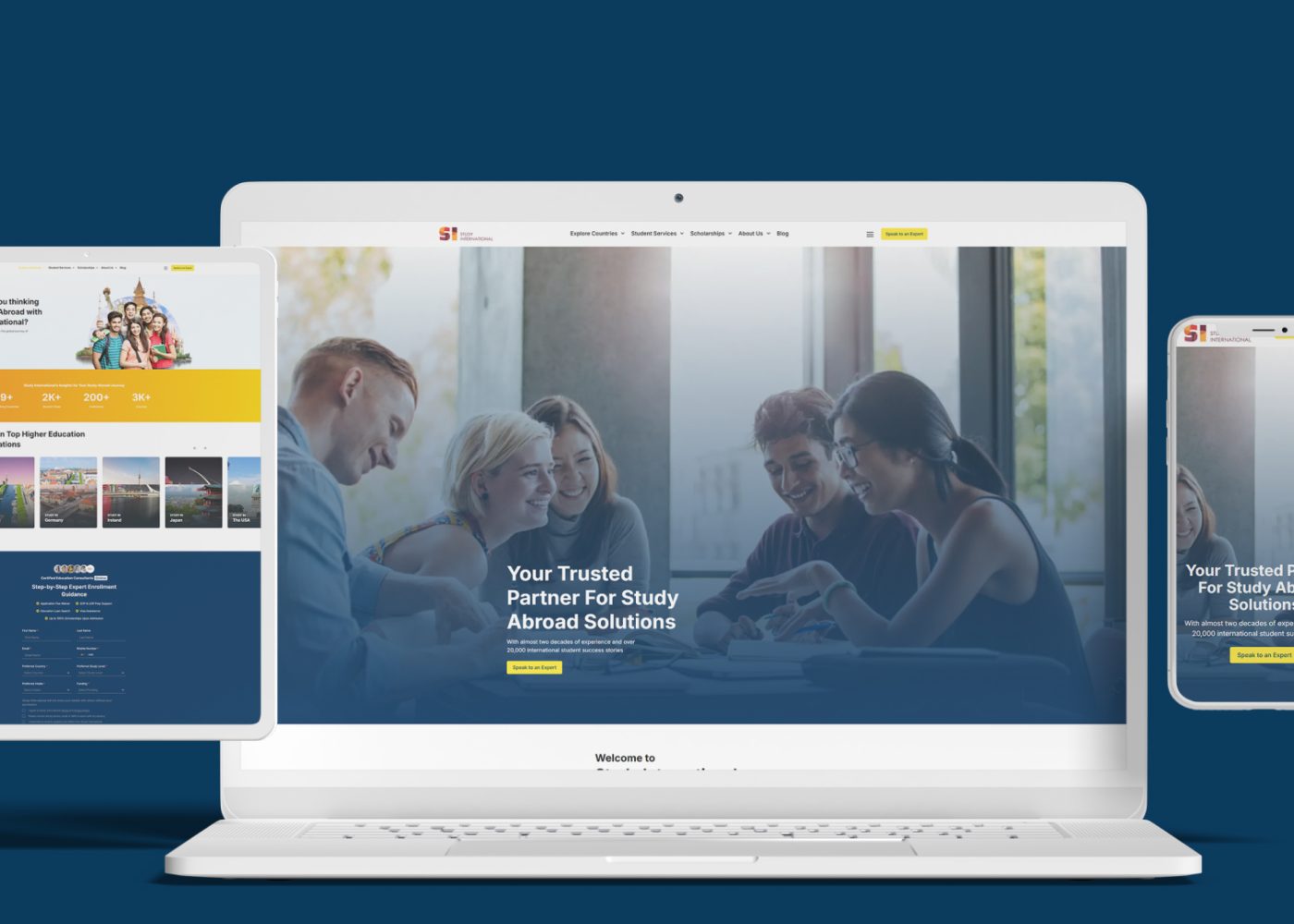
The Study International custom web application portfolio describes a public website connected with content administration, destination resources, student leads, appointments and user permissions. It provides an example of the scope to evaluate when public information and internal agency work need to connect. M4YOURS IT
Begin with the student journey, agree on the first useful release and test how an enquiry reaches the team.
Contact M4YOURS IT to plan an overseas education consultant website around your destinations, services and counselling process.
Your next project
Let’s make your brand recognizable.
Have a business in mind? Tell us about your ideas, your audience, and the identity you want to create.
Prefer a direct conversation?
FAQ
Include clear service information, destination guidance, agency and team details, evidence visitors can assess, and reliable contact or booking routes. Add university listings, resources and student accounts according to your content and operating capacity.
Define the first release around supported services, destinations, agency information and contact needs. The useful scope depends on what students need to understand and what your team can maintain accurately. Agree on complete page content before expanding.
A separate page is useful when your agency supports that destination and can provide meaningful, maintained guidance. Explain the relevant planning questions, service process and enquiry route. Assign responsibility for reviewing changing information.
Evaluate search when the volume and structure of your listings make it useful. Confirm the data source, update process, supported relationships and ownership first. A curated set of accurate options can support an earlier release.
Ask for the details needed to make a useful response, such as name, preferred contact route, education level and study interests. Include an undecided option where appropriate. Collect detailed application documents when the agreed process requires them.
Verify the integration route supported by the website and CRM. Test source context, student matching, assignment, tasks, confirmation and failure recovery. Agree on the accounts, permissions and maintenance responsibilities involved.
Evaluate the language needs of students and parents, including how your team handles enquiries. If both are offered, define which pages are translated and who maintains equivalent information as services and requirements change.
Request a proposal based on pages, content, languages, integrations and custom functions. Include hosting, maintenance, training and ongoing updates. Compare providers against the same scope and acceptance criteria to understand what each price includes.
The schedule depends on approved content, design reviews, integrations, data migration and custom requirements. Agree on milestones and client responsibilities after discovery. Include time for staff testing and handover before setting the launch date.
Track completed enquiries, their source and quality, response ownership and relevant counselling outcomes. Keep clicks, submitted requests and confirmed appointments distinguishable. Use those records alongside usability and performance measurements to decide what to improve.