
Start with eligibility, accurate business information, and a clear route to consultation. An RCIC firm’s Google Business Profile should help prospective clients understand where the practice operates, what it offers, and how to contact the team.
Build the profile around your actual business operations. Then maintain genuine photos, request honest reviews appropriately, and connect profile activity with enquiries and bookings.
Google explains that local results depend mainly on relevance, distance, and how well known a business is. You cannot pay Google for a better local ranking. Google Business Profile Help
For your immigration firm website and marketing, this means giving people a consistent, useful experience from the search result to the consultation.

Confirm Your Firm’s Eligibility Before Creating a Profile
Being an RCIC does not automatically make a business eligible for Google Business Profile. Google generally requires in-person customer contact, and online-only businesses are ineligible. Google Business Profile Help
Use this starting framework:
| How the firm operates | Practical approach |
|---|---|
| Clients visit a genuine, qualifying office | Assess eligibility for an office-based profile. |
| The firm visits clients at their locations | Assess eligibility as a service-area business. |
| Clients visit the office and the firm also visits clients | Assess a hybrid setup. |
| All consultations happen online, with no in-person service | Develop website SEO without creating an ineligible profile. |
| The address is only a rented mailbox or virtual mailing address | Do not present it as a qualifying office. |
Coworking offices need clear signage, customer access, and your own staffing during business hours. Check the guidelines for representing your business on Google before choosing the setup. Google Business Profile Help
For a service-area business that does not receive customers at its address, remove the address from public display and describe the actual area of in-person service. Video consultations across Canada do not turn the entire country into a physical service area. support.google.com
Document the decision before investing in profile promotion.
Keep Ownership With the Firm and Complete Verification
Search for the firm’s existing listing before adding another. If someone else manages it, resolve access rather than creating a duplicate to bypass the problem.
The business owner should retain primary ownership. Add authorized staff or your marketing agency through individual Google Accounts with appropriate roles. Google’s owner and manager system allows collaboration without sharing the owner’s password. Google Business Profile Help
Keep an internal record of:
- The primary owner and authorized managers.
- The business contact responsible for access changes.
- The profile’s verification status.
- The date access was last reviewed.
Complete verification through the methods Google makes available. These methods are determined automatically and cannot simply be selected on demand. Google Business Profile Help
Assign responsibility for removing access when a staff member or supplier leaves. Avoid leaving the practice dependent on one former employee’s account.





Write Profile Information That Matches the Real Practice
Use the real-world business name. Do not add search keywords or promotional labels that are not part of it. Google Business Profile Help
Choose the available primary category that best describes the business. Add only relevant additional categories, and avoid selecting a category for every service. Use the live category list rather than assuming an exact category is available. Google Business Profile Help
Prepare the remaining information with a prospective client’s questions in mind:
| Information | What your team should check |
|---|---|
| Business description | Does it clearly explain the firm’s actual services and audience? |
| Phone number | Does it reach the correct team, with a process for missed calls? |
| Website destination | Does it lead to a useful page for this business or office? |
| Service details, where available | Are the descriptions accurate and consistent with current scope? |
| Location information | Can someone understand where an in-person meeting takes place? |
Keep links out of the description field. Appointment-only firms should follow Google’s hours guidance rather than list walk-in hours. Google Business Profile Help
Where regular public hours apply, maintain them and update special hours for closures or holidays. Google Business Profile Help
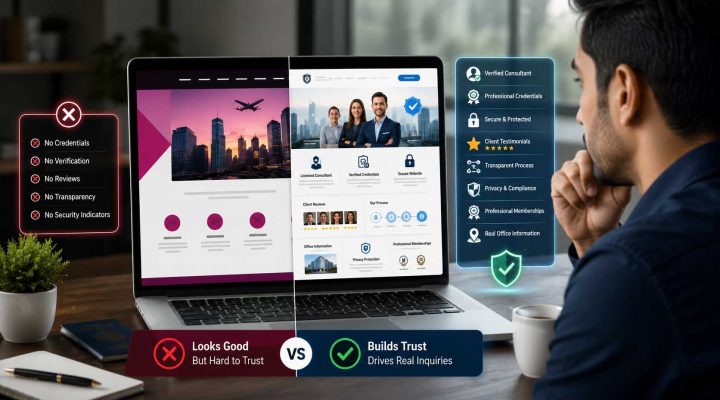
Have the responsible RCIC review profile copy and posts against the Code of Professional Conduct. Check identification, public-register information, professional claims, and confidentiality. Professional requirements and Google’s field rules both need attention. laws-lois.justice.gc.ca

Connect the Profile to a Clear Consultation Journey
A profile can attract interest while the website loses it. Open the destination page on a phone and follow the entire enquiry process.
The page should explain:
- Which services the firm currently handles.
- Who provides regulated advice and how to verify their credentials.
- Whether consultations are online, in person, or both.
- The consultation purpose and fee, where applicable.
- How to book and what confirmation to expect.
Use a destination that makes sense for the location and business. A genuine branch may need its own useful office page, while a single-office practice may have a suitable homepage.
A focused website design review can identify confusing navigation, unclear consultation details, and broken forms.
Where your profile offers a booking field, test its destination separately. Feature availability varies, so build the plan around the options actually present.
Submit a test enquiry, check the confirmation, and verify that someone on the team receives it.
Use Genuine Photos to Help Visitors Recognize the Firm
For an office-based practice, plan a small set of useful photographs: the actual entrance, signage, reception, and consultation space. Add team photographs only with appropriate permission.
Google’s photo guidance says images should represent reality and avoid significant alterations or excessive filters. An exterior photograph can help customers recognize the location. Google Business Profile Help
Before uploading, inspect desks, screens, noticeboards, and paperwork for personal information. Photograph an empty consultation room rather than a meeting involving a client.
Use your real logo consistently. Replace outdated images when the office changes.
Generated office scenes can illustrate a blog article, but they should not be presented as photographs of your firm’s actual premises.
Request Honest Reviews Without Pressure or Incentives
Choose a consistent, appropriate service milestone for an optional review invitation, such as after a completed consultation.
Apply the process without filtering people according to how positive you expect their feedback to be.
Google’s review policies prohibit incentives, selective solicitation of positive reviews, and pressure about ratings or review content. The policy also prohibits requiring or pressuring people to review while on the premises and requesting that staff solicit a certain number of reviews. Maps User Generated Content Policy Help
A neutral invitation could say:
Thank you for meeting with our team. If you would like to share your experience, you can leave an honest Google review using this link. Reviewing is optional. Please avoid including personal immigration or application information.
Insert the firm’s Google review link. Google supports sharing a review link or QR code. Google Business Profile Help
When replying, stay courteous and protect confidentiality. Do not reveal application details or confirm a professional relationship merely to rebut criticism.
A general response might say:
We take feedback seriously. Please contact our office through our published contact details so we can review your concerns privately.
If the firm wants to reuse a client endorsement in its marketing, the Code requires it to be genuine, accurate, and approved for public use in writing by the client or former client. laws-lois.justice.gc.ca




Publish Useful Updates and Maintain the Listing
Use profile posts, where available, for relevant announcements, events, and useful updates. Google provides posts as a way to communicate this information on Search and Maps. Google Business Profile Help
Suitable RCIC topics include an upcoming educational webinar, a consultation-preparation resource, or an explanation of the firm’s booking process.
Have substantive immigration information reviewed before publication. Avoid outcome guarantees or suggestions of special government connections.
Assign a weekly maintenance check for enquiries, reviews, links, and unexpected changes. Review service descriptions and photographs when operations change.
A sustainable routine is easier to manage than an ambitious publishing schedule with no owner.

Measure Enquiries and Consultations Alongside Profile Activity
Verified profiles have access to performance reports showing searches, views, website clicks, direction requests, and other applicable interactions. Available metrics vary. Importantly, the report can include activity from both organic results and Google Ads. Google Business Profile Help
Use the metrics carefully:
| Indicator | How to interpret it |
|---|---|
| Profile searches and views | Evidence of discovery and visibility. |
| Website clicks | Interest in visiting the website, not a completed enquiry. |
| Call-button clicks | Attempts to initiate a call, not proof of an answered conversation. |
| Direction requests | Interest in reaching the location, not proof of attendance. |
| Confirmed bookings and attended consultations | Operational outcomes recorded in the booking system or CRM. |
Connect reporting with approved CRM and marketing automation. Record the requested service, enquiry stage, and source where known.
If attribution is incomplete, ask how someone found the firm and label the answer as self-reported. Do not assign every Google enquiry to the Business Profile.
Review whether enquiries match the firm’s scope and become attended consultations. This helps identify unclear descriptions, missed calls, or booking friction.
Keep case details out of public profile content and analytics events.
Follow a Practical First-Month Plan
Treat the first month as an implementation period. Verification and review processes may affect what can be completed.
| Period | Priority | Reviewable result |
|---|---|---|
| Week 1 | Confirm eligibility, locate the existing listing, review ownership, and begin verification where needed. | Documented setup and access responsibility. |
| Week 2 | Review profile information, category choices, website destination, and consultation journey. | Accurate information and tested contact routes. |
| Week 3 | Add genuine photographs and introduce an approved, neutral review invitation process. | Useful visual information and a repeatable feedback workflow. |
| Week 4 | Review available performance data and compare it with enquiries and bookings. | Baseline report and a prioritized improvement list. |
A marketing strategy consultation can help assign responsibilities and connect these tasks with the firm’s wider search strategy.
Prioritize the problem affecting prospective clients most. Fix a broken booking link before adding another post.
Your next project
Let’s make your brand recognizable.
Have a business in mind? Tell us about your ideas, your audience, and the identity you want to create.
Prefer a direct conversation?
FAQ
Google excludes online-only businesses. Offering video consultations does not establish eligibility. Assess whether the practice genuinely meets Google’s in-person requirements; otherwise, focus on website SEO and other suitable marketing channels.
A Business Profile service area describes where a qualifying business visits or directly serves customers in person. Nationwide video consultations do not create nationwide physical operations. Describe remote availability accurately on the website.
Use the firm’s actual real-world name. Do not add extra locations, services, or promotional claims purely for rankings. Explain services in the appropriate fields and on relevant website pages.
Choose the most specific available category that accurately describes the core business. Check the current options inside the profile editor. Add a few relevant secondary categories only when they genuinely describe the practice.
No. Google prohibits incentives for reviews, including discounts and free services. Request optional, honest feedback without prescribing a rating or wording, and avoid selecting only clients expected to be positive.
Use a short, professional reply and invite private contact. Protect confidentiality and avoid arguing about application details publicly. Escalate sensitive responses to the responsible RCIC before posting.
Choose a schedule the team can maintain with useful, approved information. There is no universal posting frequency that guarantees rankings. Prioritize accuracy, working contact routes, and timely communication.
No. Business Profile verification and professional licensing serve different purposes. Present the consultant’s credentials accurately and provide an appropriate route for prospective clients to check the College’s public register.
A profile cannot guarantee nationwide local rankings. Distance remains part of Google’s local ranking system. Build wider website visibility around genuine services while keeping the profile’s location information accurate.
Review available profile interactions alongside actual enquiries, confirmed bookings, attendance, and service suitability. Check information accuracy, access permissions, reviews, and contact links. Record attribution limitations when reporting results.
Build a Local Search Presence Your Team Can Maintain
Start with eligibility and accurate information, then improve the path from discovery to consultation. Give ownership, review responses, updates, and reporting a clear place in the team’s routine.
M4YOURS IT can connect digital marketing, website improvements, and enquiry tracking into a practical local SEO plan.
Contact M4YOURS IT to discuss a Google Business Profile strategy suited to your RCIC firm’s actual operations.